Template Options |

|

|
|
Template Options |
|
|
Template Options |
|
|
|
Template Options |
|
|
|
|
||
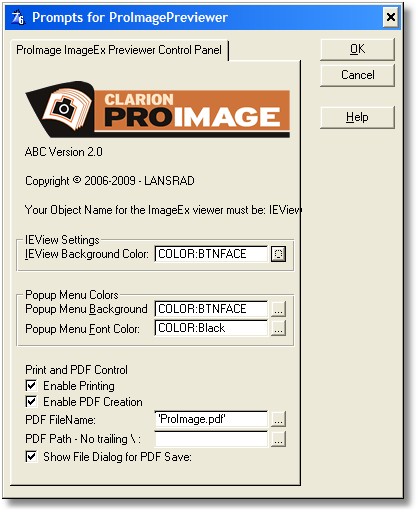
The Full Screen Previewer extension template on the procedure allows you to set the following properties:
IEView Settings
The ImageEx viewer control on this procedure is named "IEView" on the action tab.
IEView Background Color
This is the background color of the ImageEx viewer control
Popup Menu Colors
Popup Menu Background
The color of background used in any popup menus for this procedure.
Popup Menu Font Color
The color of text used in any popup menus for this procedure.
PDF and Print Control
Enable Printing
When selected this option causes the Print button to be visible
Enable PDF Creation
When selected this option causes the PDF button to be visible
PDF Filename
This is the default filename for the PDF to be created. It can be a fixed value (in single quotes) or you can use a variable.
PDF Path
The path where you want the PDF created. It can be a fixed value (in single quotes) or you can use a variable.
Note: your value here does NOT need a trailing backslash.
Show Dialog for PDF Save
When selected this option causes the file save dialog to be displayed.