Creating a Demo or Limited Version |

|

|
|
Creating a Demo or Limited Version |
|
|
Creating a Demo or Limited Version |
|
|
|
Creating a Demo or Limited Version |
|
|
Once you embed the ProCodeBlock templates or hand code in your app, you can forget that it is there and just go about your normal development work. Then when you are ready to create a demo or limited version of your application you simply check the Global CodeBlock Control box and recompile.
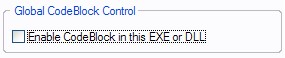
That is all there is to it!
A technique that we use (and recommend) is as follows:
1) Save your application
2) Click FILE --> SAVE AS and enter a new name for the CodeBlocked application
For example in our EZChangeLog program the regular application is EZChangeLog.app
We save it as EZChangeLogFREE.app
Then all we have to do is check the Global CodeBlock Control box and recompile.
After we copy the new compiled (and CodeBlocked) program to our distribution folder, we can simply re-open the EZChangeLog.app and continue working without needing to remember to uncheck the Global CodeBlock Control box.
It is that simple!