Adding Archive Aliases to your Dictionary |

|

|
|
Adding Archive Aliases to your Dictionary |
|
|
Adding Archive Aliases to your Dictionary |
|
|
|
Adding Archive Aliases to your Dictionary |
|
|
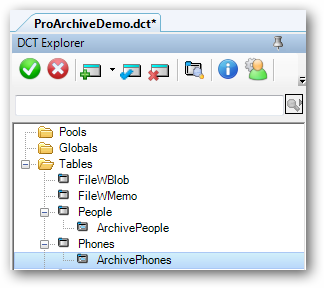
You must add a new "Archive" alias to your dictionary for each file that you want to use with ProArchive.
In the dictionary, first highlight the file that you want to create the Archive Alias for.
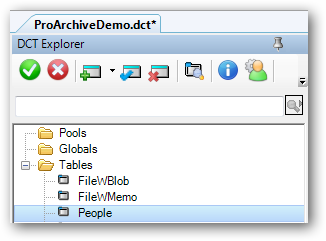
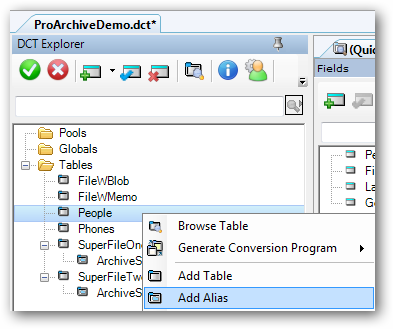
Right-click on the file and click the Add Alias.
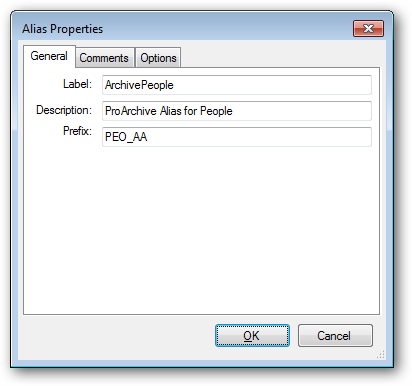
In the Alias Properties, enter the Label and Prefix for the alias file. You may also want to add a meaningful description.
NOTE: We suggest that the Label for the Archive Alias file be the word "Archive", followed by the name of the file.
This will group all of your Archive Alias files together in the template pick lists and it will make it easy for you to distinguish the Archive Alias files from other aliases in your dictionary.
You may also want to change the prefix of the Archive Alias file to be the regular file prefix, followed by an underscore and the letters AA.
Example:
File: People People
Archive Alias: ArchivePeople
Prefix: PEO_AA
Repeat this for each file in your dictionary that you want to use with ProArchive.