Controlling the Archiving actions |

|

|
|
Controlling the Archiving actions |
|
|
Controlling the Archiving actions |
|
|
|
Controlling the Archiving actions |
|
|
If you want to enable archiving of records from this browse, check the box that says Enable Archive Mode for this Procedure.
Notes:
1.Remember to setup the Table to Archive Alias Relationships on the Global Extension BEFORE you attempt to use this template!
2.Remember to add the names of the Archive Alias Tables to the "Other Files" of the file schematic tab for the procedure (for both the parent and child alias files) so that ProArchive can "see" them.
First select the Primary Table to Archive from the droplist.
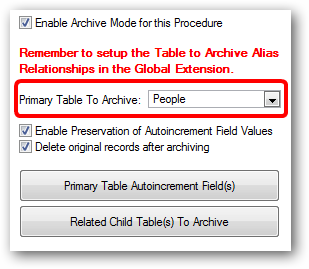
Preservation of Autoincrement Field Values
By default the archive action will preserve the values of autoincrement fields.
Delete original records after archiving
By default the original record will be deleted from the active file if the archive action is a success.
Configuring Primary Table Autoincrement Fields
Click this button to configure the primary table autoincrement fields:

Click here for details on Configuring Primary Table Autoincrement Fields
Configuring Related Child Tables to Archive
ProArchive can automatically archive records from one or more child files related to the primary table.
Click this button to add and configure any related child files

Click here for details on Configuring Related Child Tables to Archive.